Friday, August 04, 2006

Whats inside the NXT Brick: Part III

Today is part three of Whats inside the NXT Brick series. Today's article will focus on the sensor ports, how they work, and the three different types of sensors.

The NXT features four sensor ports. Thats one extra port compared to the RCX's three input ports. These ports are based on the same six pin/wire design as the motor ports. However, the use of the wires is a little different...

Sensor Port Layouts
The following drawing shows the layout of the input ports.
A Drawing of the Lego Mindstorms NXT Robotics System input ports
The first ANA pin is connected to the avr processor and the current generator. What this means is that the ports can generate the power needed to run the old RCX sensors from this wire. The second and third pins are simple ground wires. Nothing too special about them. The fourth pin, IPOWERA is the wire responsible for powering the NXT sensors. Pins five and six are responsible for doing the heavy duty work with the sensors. Both of these pins are connected to the ARM7 processor and are the ones responsible for taking the signals from the sensor and delivering them to the NXT for diagnosing.

Sensor TypesThere are three different types of sensors in the Mindstorms NXT Robotics set.

The first type is the active sensor. This type of sensor requires a constant supply of power to continouously measure the sensor's level. They also require a specific power to measurement timing. This special timing is achieved by powering the sensor for 3 milliseconds and then measuring the results for .1 milliseconds. This process is repeated constantly. There are only two types of sensors that are active sensors, both of which are found in the old RIS kit: the light sensor and rotation sensor.


Passive sensors on the other hand do not require any specific power/time measurement. The measurements that they take are refreshed every 3 milliseconds because the timing has to be the same as the active sensor setup. Passive sensors include: touch sensors for both the RIS and NXT, light sensor in the NXT, sound sensor, and the temperature sensor.

The digital sensor is the newest addition to the LEGO sensors. There is only one sensor that is in this catagory: the new ultrasonic sensor. The reason that they are called digital sensors is because on these new types an external chip on the sensor is used to process the data that is being sampled.

Thats all for tonight, check back tomorrow!

Thursday, August 03, 2006

Whats inside the NXT Brick: Part II

This is part two of Whats inside the NXT Brick series. Yesterday we took a look at the hardware specs and what makes the tick! In this article we will look at how the new motor ports and wiring system work...

The NXT Brick has three output motor ports on top of the brick for controlling the newly designed servo motors. To connect the servo to the NXT a 6-wire interface is used. This new six wire design allows the NXT to not only to control the servos but also for the servos to send information back to the NXT.

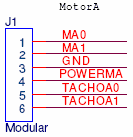
EMotor port output configuration on the Lego Mindstorms NXT Robotics Systemach of the six pins has a different task. The first two pins, MA0 and MA1, are output control signals that tell the servos how to act. The third pin, GND, is the ground for the power supply to servo configuration. Fourth, POWERMA, is the 4.3v power supply. Finally pins five and six, TACHOA0 and TACHOA1 are the input signals that contain Schmitt trigger functionality.
The MA0 and MA1 output signals are controlled by an internal motor driver that supplies a continuous stream of 700 mA to each motor port. This can peak at a 1A max. The signals can me switched back and forth between float and brake. This means either your robot will coast freely when set to float, or will come to an immediate halt when set to brake. Most importantly though, the motor driver that controls these signals has built in thermal protection! This means that if for some crazy reason the NXT is pulling too much power for the servo, they will automatically limit the output current! Woohoo! No more fried motors!

The POWERMA pin is connected to the power outputs and can draw a maximum 180 mA. Really what this means is that when split up, each port can draw up to 20 mA. Another smart feature that the boys at lego thought of: if the port is drawing more than the 20 mA limit, the NXT will automatically reduce it back to 20 mA! Another safety feature is short circuited to the ground wire the NXT will automatically reset!

Finally, TACHOA pins carry the important task of reporting information back to the NXT. These two pins are also fitted with Schmitt triggers mounted between the ports and the processor. When you first take your NXT out of the box and have the standard firmware, these two signals are preset to work as rotation sensors for the motors and to check which way the motors are running.

Another great feature of the new NXT six-wire interface is the backwards compatability. The NXT wires are designed in a way that they can be spliced in a way to connect to the old RIS RCX! Philo has done some great work on showing how this can be done in his Custom NXT Cables Tutorial.

That's all for this part, check out the next article for a look at the sensor input system!

P.S. Be sure to go check out LEGO's Hardware Developer Kit!

Wednesday, August 02, 2006

Subscribe to our feed!

Just a quick update, I've added a bunch of buttons to add our blog feed to your favorite rss aggregators. Hope this helps out in adding your feeds!

What's Inside the NXT Brick?

This is the first in a series of mini articles that will take a look at the internals of the new Lego Mindstorms NXT Intelligent brick. In these articles I will take a look inside the NXT Brick what it is, how it works, and what makes it run. Check out part one of this series about the hardware inside of the NXT Intelligent Brick.

The full hardware specs as released by LEGO are as follows:

  • Main processor: Atmel® 32-bit ARM® processor, AT91SAM7S256
    • - 256 KB FLASH
    • - 64 KB RAM
    • - 48 MHz
  • Co-processor: Atmel® 8-bit AVR processor, ATmega48
    • - 4 KB FLASH
    • - 512 Byte RAM
    • - 8 MHz
  • Bluetooth wireless communication CSR BlueCoreTM 4 v2.0 +EDR System
    • - Supporting the Serial Port Profile (SPP)
    • - Internal 47 KByte RAM
    • - External 8 MBit FLASH
    • - 26 MHz
  • USB 2.0 communication Full speed port (12 Mbit/s)
  • 4 input ports 6-wire interface supporting both digital and analog interface
    • - 1 high speed port, IEC 61158 Type 4/EN 50170 compliant
  • 3 output ports 6-wire interface supporting input from encoders
  • Display 100 x 64 pixel LCD black & white graphical display
    • - View area: 26 X 40.6 mm
  • Loudspeaker Sound output channel with 8-bit resolution
    • - Supporting a sample rate of 2-16 KHz
  • 4 button user-interface Rubber buttons
  • Power source 6 AA batteries
    • - Alkaline batteries are recommended
    • - Rechargeable Lithium-Ion battery 1400 mAH is available
  • Connector 6-wire industry-standard connector, RJ12 Right side adjustment
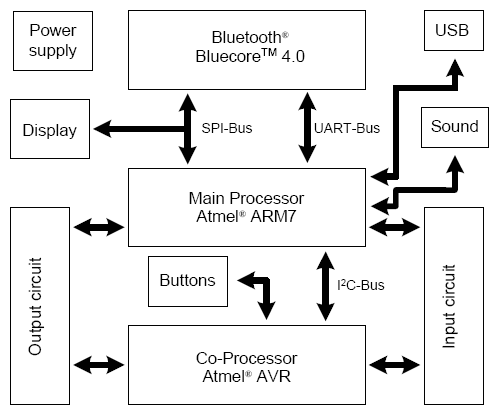
The basic schematic for how the NXT brick interacts looks something like this:


For full schematics and information download LEGO's NXT Hardware Developer Kit.

Be sure to check out the next article about the motor and sensor ports of the NXT brick.

Tuesday, August 01, 2006

A Closer Look at the NXT Motors

A closer look at the servo motors contained in the new Lego Mindstorms NXT Robotics SystemContained in the new Lego Mindstorms NXT kit are three newly designed servo motors. Compared to the old 9v square motors contained in the original Robotics Invention System the NXT motors are much slower, but make up for their speed in the amout of power they hold...

The servo under no load runs at 170 rpm compared to the old style motor which ran at 360 rpm. The difference however is in the amperage drawn by the motors. The servo draws 60 mA of power whereas the old motor drew 3.5 mA.

This increased power draw in turn provides more torque. The NXT servos stall out when put under a load of 50 N cm. At the stalling point the servo draws 2 A of current.

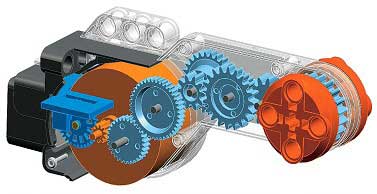
Slower speeds are the result of an internal gear train that provides the extra torque. A computer generated image provided by Lego Education shows the servo internals here:The internals of the Mindstorms NXT Servo
The actual internals of the motor can not be completely seen due to the construction of the servo. To view the inside of the servo the motor would have to be broken and would no longer work. You can check more internal pictures at Philo's NXT Motor Page


This article is only a glimpse into the internals and statistics of the new NXT servos. For more information you should check out Philo's NXT Motor Page where much of this information was found.