Monday, August 14, 2006

LabVIEW Toolkit for NXT Robotics

Last week LEGO Mindstorms along with National Instruments, creators of the NXT programming system, announced that they would be releasing the NI LabVIEW Kit for the Lego Mindstorms NXT Robotics System. The LabVIEW program opens the possibilities of creating VI's to use with the NXT system along with creating custom blocks of programming for these VI's.

The LEGO group's director of the Mindstorms division, Soren Lund, said, "The availability of the LabVIEW Toolkit for LEGO MINDSTORMS NXT is critical for encouraging the development of additional tools for the system..." Lund went on to say, "One of the key reasons for working with National Instruments to develop the NXT software was the ability for third-party developers to use LabVIEW to create add-on software blocks for our software. In addition, experienced MINDSTORMS users can easily migrate from the graphical drag-and-drop environment of MINDSTORMS NXT to the more advanced graphical programming in LabVIEW. Providing the tools advanced users need to take our system to the extreme is what made the legacy MINDSTORMS platform a huge success, and the NI toolkit furthers that tradition."

Using the LabVIEW toolkit, users are able to interact directly with the NXT while a program is running. A LabVIEW control can be added to the program allowing data to be sent to the NXT to influence it's actions as the program is running. This concept also works in the opposite way allowing a LabVIEW indicator to send information back to the computer at a point in the program.

John Barnes, president of HiTechnic says,"The LabVIEW Toolkit for LEGO MINDSTORMS NXT makes customizing add-ons for the NXT extremely easy and encourages users to expand the MINDSTORMS experience. This type of customer-driven functionality will extend and enhance the experience of MINDSTORMS fans of all ages." HiTechnic was mentioned in the previous story Advanced NXT Sensors.

For more information check out the Lego Press Release.
Sunday, August 13, 2006

Advanced NXT Sensors

Along with releasing the schematics and software for the Mindstorms NXT Brick, the LEGO Corp has also decided to release the schematics and configuration specifications for all of the NXT sensors(found here). What this means to the everyday Lego Mindstorms NXT user is that the door has been opened to the possibilities of new advanced sensors.

So far two different groups, Hitechnic and Mindsensors, have utilized the information in the hardware manuals and have come up with some new and exciting sensor and motor configurations…

There are currently two new sensors available for the NXT system: a magnetic compass and a motor multiplexor.

The magnetic compass for the NXT, produced by Mindsensors, measures the deviation from the magnetic north pole of the earth. This sensor allows you to send your robot in a specific direction or heading. The compass is based on the orthogonal two-axis magnetic sensor from Honeywell (HMC1052). The sensor is compatible with the NXT-G, NBC, and Robot-C coding languages. It also has three different reading modes: Int/Byte/Float.

The second sensor, the motor multiplexor also produced by Mindsensors, allows up to four older RCX motors to be connected to the new NXT Brick. The multiplexor plugs directly into the NXT motor port, however because of the power draw limit for each port it must be powered from an external power supply.

While these two sensors are the only ones in production there are many amazing ideas being developed. A few of these include:
• 4 port/4 Motor Multiplexor, powered by battery or external supply.
• Temperature Sensor
• RCX/NXT communication bridge
• 3 Axis Angle Measurement
• Color Sensor

Be sure to check out these sensors and many more at Mindsensors and Hitechnic!

Monday, August 07, 2006

NXT Bluetooth and control

One of the most advanced features on the new Mindstorms NXT system is its ability to control and communicate via Bluetooth technology. Inside of the NXT Brick, controlling all Bluetooth communications, is a CSR Blue Core™ 4 chip. This one chip allows the NXT to be connected wirelessly to 3 different sources at the same time. This Bluetooth wireless technology opens the door for thousands of new possibilities. One of these is a PC based Bluetooth controller for the NXT. Check it out...

The Bluetooth system on the NXT is designed to run in a master/slave configuration. Each NXT brick can connect with up to three other NXT devices. However, the NXT can only communicate with one slave source at a time. For example if the Master NXT is communicating with NXT Slave 1 it must finish sending/receiving data before it can communicate with NXT Slave 3.

One drawback to this master/slave setup is that the LEGO programmers have designed the firmware in such a way that the NXT cannot serve as a master and a slave at the same time.

The communications between NXT's and other Bluetooth devices is done through one of four channels.

• Channel 0 - This channel is reserved for slave communication to the master. By default all slaves will send data to the master on channel 0.

• Channels 1, 2, 3 - The other three channels are used by the NXT master to send data or instructions to the slave on that channel.


Another aspect to the Bluetooth connectivity is the ability to control the NXT remotely from a PC, cell phone, laptop, and more. One of the newest programs for remote NXT control is called OnBrick.

OnBrick takes advantage of the NXT Bluetooth technology to create a 20 button programmable NXT remote controller. In all there are 36 different actions that the remote can perform including: motor control, sounds, sensor input, power settings, and many more!

Be sure to check the OnBrick Website for pictures, information, and more. Also you may want to download the official Lego Mindstorms NXT Bluetooth Developer Kit.

Sunday, August 06, 2006

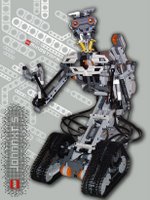
Robot Spotlight: JohnNXT 5

JohnnyNXT 5 created by Daniele Benedettelli is a mock up of Johnny5 built entirely of the Lego Mindstorms NXT Robotics System.
Daniele Benedettelli, a member of LEGO's MDP (Mindstorms Developer Program), has designed and built an NXT version of Johnny5 from the 1986 movie Short Circuit. Check out more pictures and a link to his MDP page...

Danny is one of a few select builders that have been chosen to take part in a Mindstorms Developer Program. His MDP page can be found at http://mindstorms.lego.com/MeetMDP/DannyB.aspx. He also has a personal webpage featuring Johnny5 at http://unitutor.unisi.it/~danny/JohnNXT.htm.

JohnNXT 5 is based upon Danny's older RCX Johnny5. JohnNXT 5 features two NXT Intelligent Bricks interfacing via bluetooth technology. The first NXT unit is in charge of moving via a treaded system and raising and lowering the torso of JohnNXT. It also controls the sensor input from line following light sensor, a stereo system consisting of two sound sensors, and the ultrasonic sensor on his head.

The second NXT unit moves johnny's arms and laser, it also provides for head movement. An interesting note about JohnNXT's arms: When the motor turns one way his arms unfold, the hands open up, and the wrists turn. When the motor is put in reverse his wrists turn, hands close, and the arms fold back up.

JohnNXT 5 can perfrom a range of tasks such as following a line, wall, sounds, objects, and many more options! Now with the NXT it would even be possible to have JohnNXT 5 play sound clips from the original movie!JohnnyNXT built from the Lego Mindstorms NXT Robotics system.
Check out these pictures and more information at http://unitutor.unisi.it/~danny/JohnNXT.htm

Saturday, August 05, 2006

Next Byte Codes aka NBC

Are you a programmer looking for a more functional and structured code for the NXT? Well, look no longer because NBC (Next Byte Codes) is the language for you! The NBC code is based on the wildly popular NQC (Not Quite C) for the RCX. That means those who have coded before in NQC can now easily learn NBC...

Quoting the developers of NBC, "NBC (Next Byte Codes) is a programming language for the LEGO MINDSTORMS NXT product. NBC's syntax is based on assembler programming languages, so experienced assembler programmers (or just about any programmers) should find it very easy to get started with. Even if you aren't an experienced programmer, NBC is relatively easy to learn." Source

While NBC is run and compiled from the command line, it also can be interfaced with BricxCC Command Center to give it a graphical front end.

If you are interested in NBC you can find more information and download it from the BricxCC Sourceforge page. In addition you can also find sample programming on the website.

Just a quick note: NBC is also 100% absolutely free. It is released under a Mozilla Public License