Sunday, July 08, 2007

Get Inspired!

How many times have you found yourself sitting in front of a pile of Legos with not a single idea of what to build. Well, here are a few tips that can help keep the creative juices flowing and provide you with some inspiration.

Possibly the best method of inspiration I have ever heard of is the use of something called a "Morgue File." Originally it started out as a web designer's tool, but in my opinion it can also be used with Mindstorms NXT. The idea is simple, create a folder on your desktop called NXT Ideas. Whenever you are browsing the net and see an idea or robot that you think is cool, save that page or image in your NXT Ideas folder.

The idea is when your creativity "dies" you open up your morgue file and browse through all of the awesome ideas you have saved. One of these ideas is bound to inspire you and give you a great idea for your next robot.

A few creative sources include:
Youtube videos of NXT
The Official NXTLOG
Brickshelf NXT Galleries


So readers where do you get your inspiration from?
Leave a comment!

Tuesday, July 03, 2007

NXT Log Challenge: Bug Bot


A few months ago in April, the LEGO Mindstorms website sported a brand new feature - building contests. The first two contests included a FLL robot and a quadruped walker. Now for the third challenge, LEGO wants to see you build your best bug bot! Your challenge is to design a NXT Insect or a NXT robot that can fight pesky pests.

Your insect creations are judged on a few different aspects including:

  • Design
  • Performance
  • Creative use of NXTLOG
You can check out the full contest brief including all the rules, inspiration, judging criteria, and commenting at the official LEGO NXTLOG Challenge page.

Sunday, July 01, 2007

Bluetooth Gravity Controlled Robot

Check out this cool find over at the nxtasy blog.

Ulli Kortenkamp has used bluetooth technology along with an Apple Macbook's internal gravity sensors to create a gravity controlled robot.


Ulli Writes on the You Tube page:

"In this video we show how to use the gravity sensor of a Apple MacBook Pro in order to remote control a LEGO MINDSTORMS NXT robot. They connect via bluetooth, and the Interactive Geometry Software Cinderella.2 is used as controlling software. It reads the data from the gravity sensor of the MacBook, processes it and then controls the motors of the NXT robot accordingly.

More info about Cinderella at http://cinderella.de, contact: kortenkamp@cinderella.de. Recorded at the University of Education Schwäbisch Gmünd, Germany."

Saturday, June 23, 2007

New IR Seeking Sensor

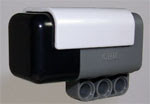
IRSeeker an infrared seeking Mindstorms NXT Sensor
HiTechnic has done it again with the introduction of their newest sensor: The NXT IRSeeker. The new sensor does exactly what it is named for: it seeks out infrared light sources. Outfitted with an array of infrared sensors, the IRSeeker has a 135 degree field of vision. With the multiple sensors inside, the IRSeeker can display approximately where and how far away an IR light source is from the sensor.

One real world application that HiTechnic has pointed out is locating the infrared RoboCup soccer ball.

HiTechnic has take it one step further by detailing the process of programming the new sensor and how to use it in your NXT programs.

You can check out the IRSeeker and more information at HiTechnic.

Saturday, June 16, 2007

Mindstorms Cellular Bluetooth NXT Control

With the addition of the bluetooth technology in the Mindstorms NXT system a whole new area of control was opened. The guys over at LEGO have introduced bluetooth support for the Mindstorms NXT system in the area of bluetooth enabled cell phones.

Recently, LEGO has made available their NXT Mobile Application that allows you to control your robot wirelessly via bluetooth technology. According to their specifications the following cell phones are supported:

  • Nokia: 6680, 3230
  • Sony Ericson: W800i, W550i, K610i, K800i, K750i, Z710i, Z550i, K510i
  • BenQ-Siemens: CX75, X75
With the software provided by LEGO, you can control your robot in two different modes: remote control and program control. In the remote control setting you can direct and drive your robot with a joystick/command wheel. On the other hand, in program control, you can select what program you want the NXT to run and then use the numbers to send the NXT messages during the program.

It's amazing to see what LEGO has done with bluetooth in the NXT system. With such great innovations already, I'm excited to see what the future holds for bluetooth and the NXT!

Check out the official LEGO Mindstorms NXT Mobile Application page for more info and downloads.